HCI 201: Multimedia and
the World wide Web
Announcements
|
Contact me |
||
| Announcements | Resources | Course Guidelines |
-
HW 5 is up its different than it was before in terms of css requirements.
-
examples of the questions I will be asking on the midterm
-
the book mentioned in class last week "HTML for the World Wide Web with XHTML and CSS: Visual QuickStart Guide (5th Edition)"
-
HW 5 example (by class time)
-
grading criteria HW 5 (by class time)
-
Be sure to leave current homework pages intact- when you are making new pages for the following week's HW - do not disturb originals- for example HW 4 is due this coming Tuesday- HW 3 should still be available without the HW 4 modifications.
-
hex color codes can be found here: http://hotwired.lycos.com/webmonkey/reference/color_codes/
- Finally when you name your
pages be sure that the name has no spaces in it for example
carcontent.html is a correctly named page
whereas car content 1 .html is not correctly named
-
when you create the page of your site's unformatted written content this needs to be in a .html file not a. doc file
-
Also your page should include *all* of the written content your entire site is going to house.
-
New UNIX help page
-
HW2 has been revised. Example for hw2
-
Notes for tomorrow, Tuesday 9/24 will be posted by 4 PM 9/24
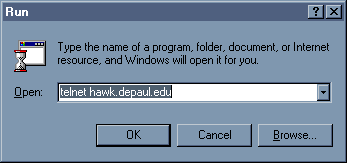
In order to connect to your hawk account you must be connected to the Internet. type telnet hawk.depaul.edu into the run box from the start menu. You must have your login and password. - This is what your run box
should look like when you access ftp
- Read these to find out about
telnet, creating your public_html directories, ftp etc
The 3 articles will tell you how to do everything step by step:http://service.depaul.edu/dpo/support/unix/intro.html
http://service.depaul.edu/dpo/homepage.html
http://webreference.com/roadmap/map13.html
|
Contact me |
||
| Announcements | Resources | Course Guidelines |