Researched and prepared
by Dmitriy Zinkichev
Java, being robust, secure, easy to use, easy to understand, and automatically down loadable on a network, is an excellent language basis for database applications. What is needed is a way for Java applications to talk to a variety of different databases. JDBC is the mechanism for doing this.
JDBC extends what you can do in Java. For example, with Java and the JDBC API, it is possible to publish a web page containing an applet that uses information obtained from a remote database. Or an enterprise can use JDBC to connect all its employees (even if they are using a conglomeration of Windows, Macintosh, and UNIX machines) to one or more internal databases via an intranet. With more and more programmers using the Java programming language, the need for easy database access from Java is continuing to grow.
MIS managers like the combination of Java and JDBC because it makes disseminating information easy and economical. Businesses can continue to use their installed databases and access information easily even if it is stored on different database management systems. Development time for new applications is short. Installation and version control are greatly simplified. A programmer can write an application or an update once, put it on the server, and everybody can access to the latest version. And for businesses selling information services, Java and JDBC offer a better way of getting out information updates to external customers.
JDBC can be used to do the following:
The following code fragment gives an example of the functions:
Connection con = DriverManager.getConnection (
                       "jdbc:odbc:wombat", "login", "password");
Statement stmt = con.createStatement();
ResultSet rs = stmt.executeQuery("SELECT a, b, c FROM Table1");
while (rs.next()) {
        int x = getInt("a");
        String s = getString("b");
        float f = getFloat("c");
        }
In summary, the JDBC API is a natural Java interface to the basic SQL abstractions and concepts. It builds on ODBC so programmers familiar with ODBC will find it very easy to learn. JDBC retains the basic design features of ODBC; in fact, both interfaces are based on the X/Open SQL CLI (Call Level Interface). The difference is that JDBC builds on and reinforces the style and virtues of Java, and, of course, it is easy to use.
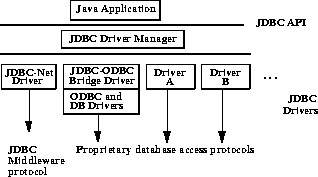
The following Figure will give more insight on how Java connects to Empress Databases and which components are involved there. For Empress RDBMS is to connect through JDBC-ODBC Bridge using Empress ODBC Driver.
Components involved in connection:
The network-oriented nature of Java makes it an ideal candidate for client/server computing, especially now that the ability to integrate it with popular commercial Database Management Systems (DBMS) is in the making. I have heard people question the validity of Java for formal application development. Many users are confused as to the nature of Java and adhere to the notion that it is useful only for making simple animation and small applets for the Web. This is like saying that your heavy-duty Dodge Ram pickup is useful only for taking you to the neighborhood grocery store.
Most of the vendors see the opportunities of Java's portability and security as the prime reason to replace the current programming languages in their main development environment. However, it seems that the mass media concentrates only on the toys that you can make. The truth is that everything that you can do in C++, you can do in Java. And more. And even though currently there is a dearth of market-ready Java applications, this isn't surprising. Consider the large span of time that C++ has already had in the market.
Nevertheless, Java provides new means for communicating with databases through a system similar to that of C and C++ applications. In addition, the platform neutrality of Java cannot be stressed enough from the programmer's point of view.
Top commercial database product vendors like Oracle, IBM, Sybase, SAS, and Borland have been taking a careful look at the Java-DBMS integration methodology. A large number of third-party developers such as Gupta, Rogue Wave, Symantec, and Intersolv are also very interested in this new market. A small part of this interest stems from the need to keep a high-profile image. But in large part, these companies see a new opportunity that programmers everywhere will be taking advantage of in the near future. Starting now gives them a head start in this revolutionary market. Database and connectivity vendors can get a jump on what will be the next, truly distributed processing system.
JDBC
The first standardized work on Java-DBMS connectivity appears in a
draft specification known as the Java Database Connectivity (JDBC)
Application Programming Interface (API) specification. Created with
the help of the aforementioned database and database-tool vendors, it is
intended to fill the current vacancy in this level of connectivity that
has prompted companies like Weblogic to develop proprietary interfaces.
To avert a potential Tower of Babel in the future due to proprietary mechanisms, work on JDBC is progressing rapidly. The initial specification was released on March 8, 1996 as a draft for open analysis. Towards the end of summer when the beta stages will near completion, vendors will also be close to releasing their candidate products for JDBC compliance.
JDBC creates a programming-level interface for communicating with databases in a uniform manner similar in concept to Microsoft's Open Database Connectivity (ODBC) component which has become the standard for personal computers and LANs. The JDBC standard itself is based on the X/Open SQL Call Level Interface, the same basis as that of ODBC. This is one of the reasons why the initial development of JDBC is progressing so fast.
Object classes for opening transactions with these databases are written completely in Java to allow much closer interaction than you would get by embedding C language function calls in Java programs, as you would have to do with ODBC. This way we can still maintain the security, the robustness, and the portability that make Java so exciting. However, to promote its use and maintain some level of backward compatibility, JDBC can be implemented on top of ODBC and other common SQL APIs from vendors.
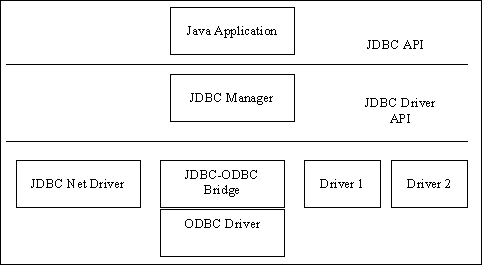
Figure 1. The JDBC API Layers
JDBC consists of two main layers: the JDBC API supports application-to-JDBC Manager communications; the JDBC Driver API supports JDBC Manager-to-Driver implementation communications. The Manager handles communications with multiple drivers of different types from direct-interface implementations in Java to network drivers and ODBC-based drivers.
In terms of Java classes, the JDBC API consists of:
The JDBC Driver API is contained in java.sql.Driver. Each driver must provide class implementations of the following virtual classes: java.sql.Connection, java.sql.Statement, java.sql.PreparedStatement, java.sql.CallableStatement, and java.sql.ResultSet. These virtual classes describe the API but are specific to how each database functions. The JDBC-ODBC bridge performs translations of JDBC calls to that which can be understood by ODBC clients at a C language level. This bridge is quite small due to the similarities of the specifications. The bridge is needed to isolate native C language calls to a controlled area while maintaining compatibility with non-JDBC databases.
JDBC over the Internet
One prime concern for JDBC is how it will function over the Internet.
Sun is certainly pushing for active commercial use of large networks
like the Internet, and the database vendors also recognize this
importance.
Most of issues surrounding security are already addressed in the Java language specification; however, other elements like addressing specific instances of databases across the Internet must be taken into account. For this reason, JDBC borrows the Uniform Resource Locator (URL) syntax for globally unique database addressing. Most readers will recognize common URL schema like http://www.javaworld.com, indicating a World Wide Web address. JDBC follows a similar syntax. First, let's review all the elements of the URL, in case anyone is not familiar with it.
A complete URL consists of several elements as outlined in the example below:
http://host.domain.com:80/directory/directory/filename
The word "http" indicates the URL schema; this example indicates that it is of the HyperText Transport Protocol. The next group "host.domain.com" is the unique Internet hostname as assigned to each machine. The number "80" indicates the Internet host port number at which the service is located; port number 80 is the default port for http services. The set of directories then outline where in the hierarchy on that service the "filename" is located and, of course, the filename indicates the actual data item to retrieve.
JDBC's URL structure is very similar:
jdbc:odbc://host.domain.com:400/databasefile
Note that in addition to the main schema, JDBC, this structure also includes a subprotocol for ODBC. The subprotocol indicates how the JDBC Manager will access the database; in this case, the database file is accessed through the JDBC-ODBC bridge. The rest is the same as for regular URLs, indicating the hostname, port, and database location and name.
For programmers
To help current database-management staff and programmers
understand JDBC better, we provide the following details about this
interface.
Asynchronous operation that is sometimes built into other database APIs as specific SQL statements and additional mechanisms is already covered by the multithreaded nature of Java. The programmer can create separate threads from the main one for each asynchronous activity. However, all operations using the java.sql classes must be written as multithread-safe code, even if the objects themselves mostly access the operations through single threads. For details on making your code multithread safe, please look in the documentation for Java. The API provides transaction-handling and rollback procedures as well. However, the details of how the implementation works is left to the driver. Each transaction is started with a specific beginTransaction method and can then be committed or aborted as necessary. Once committed or aborted, all open statements for that transaction will be closed.
SQL has often been extended to provide the missing functionality in the original standards specification. To accommodate for these, JDBC provides a mechanism for embedding extended SQL statements similar to that available in ODBC. The syntax here is:
{keyword ... parameters ...}
To further compensate for the features of specific databases, vendors are allowed to extend the basic statement classes for their own designs. However, the basic statement classes must be supported at minimum with all databases for JDBC compliance.
Data types
The following table shows the data types supported in JDBC
SQL Type        Java Type               Description

CHAR            String                  Single Character
VARCHAR         String                  Variable length string of characters
LONGVARCHAR     java.io.InputStream     Very long (multi-megabyte) strings
NUMERIC         java.sql.Numeric        Absolute precision fixed-point values
DECIMAL         java.sql.Numeric        Absolute precision Decimal value
BIT             boolean                 Single bit/binary value (on or off)
TINYINT         byte                    8-bit integer
SMALLINT        short                   16-bit integer
INTEGER         int                     signed 32-bit integer
BIGINT          long                    signed 64-bit integer
REAL            float                   Floating-point value
FLOAT           float                   Floating-point value
DOUBLE          double                  Large floating-point value
BINARY          byte[]                  Array of binary values
VARBINARY       byte[]                  Variable length array of binary values
LONGVARBINARY   java.io.InputStream     Very large (multi-megabyte) array of binary values
DATE            java.sql.Date                   Date value
TIME            java.sql.Time           Time value (GMT)
TIMESTAMP       java.sql.Timestamp      Time value with additional nanosecond field
To sum up
JDBC follows an established specification and tried implementation for
database-neutral communications from applications. The bridging
solution to current ODBC systems allow users to maintain compatibility
with older systems that may not have JDBC counterparts. Leading
vendors are working very actively on getting JDBC components for
their databases out to market in a relatively short period of time.
JDBC is still in the germination stage. Any fruits of this labor may be seen later this year when the vendors are ready. There is a certain implicit haste in all Java development right now. It seems that competition is brewing from the Microsoft side. ActiveX (formerly OLE Control Extensions) and Visual Basic comprise Microsoft's bid for the online portable networked applet world. The problem of platform neutrality is clearly evident in that solution; however, there is already a large base of developers for the Visual Basic market that may hold the potential to overwhelm other efforts. Enterprise-level components like JDBC may be among the deciding factors when software development firms are faced with this new race.
The JDBC API is implemented via a driver manager that can support multiple drivers
connecting to different databases. JDBC drivers can either be entirely written in the
Java programming language so that they can be downloaded as part of an applet, or they
can be implemented using native methods to bridge to existing database access libraries.

JDBC drivers fit into one of four categories:

1.  The JDBC-ODBC bridge provides JDBC access via most ODBC drivers. Note that some
    ODBC binary code and in many cases database client code must be loaded on each
    client machine that uses this driver, so this kind of driver is most appropriate
    on a corporate network, or for application server code written in the Java
    programming language in a 3-tier architecture.
2.  A native-API partly-Java technology-based driver converts JDBC calls into calls on
    the client API for Oracle, Sybase, Informix, DB2, or other DBMS. Note that,
    like the bridge driver, this style of driver requires that some binary code be
    loaded on each client machine.
3.  A net-protocol all-Java technology-based driver translates JDBC calls into a
    DBMS-independent net protocol which is then translated to a DBMS protocol by a server.
    This net server middleware is able to connect its entirely Java technology-based
    clients to many different databases. The specific protocol used depends on the vendor.
    In general, this is the most flexible JDBC alternative. It is likely that all vendors
    of this solution will provide products suitable for Intranet use. In order for these
    products to also support Internet access they must handle the additional requirements
    for security, access through firewalls, etc., that the Web imposes. Several vendors
    are adding JDBC drivers to their existing database middleware products.
4.  A native-protocol all-Java technology-based driver converts JDBC calls into the
    network protcol used by DBMSs directly. This allows a direct call from the client
    machine to the DBMS server and is a practical solution for Intranet access. Since
    many of these protocols are proprietary the database vendors themselves will be the
    primary source for this style of driver. Several database vendors have these in
    progress.
This section has the following subsections:
Developers who are familiar with the Oracle Call Interface (OCI) layer of client-side C code will recognize that JDBC provides the power and flexibility for the Java programmer that OCI does for the C or C++ programmer. Just as with OCI, you can use JDBC to query and update tables where, for example, the number and types of the columns are not known until runtime. This capability is called dynamic SQL. Therefore, JDBC is a way to use dynamic SQL statements in Java programs. Using JDBC, a calling program can construct SQL statements at runtime. Your JDBC program is compiled and run like any other Java program. No analysis or checking of the SQL statements is performed. Any errors that are made in your SQL code raise runtime errors. JDBC is designed as an API for dynamic SQL.However, many applications do not need to construct SQL statements dynamically because the SQL statements they use are fixed or static. In this case, you can use SQLJ to embed static SQL in Java programs. In static SQL, all of the SQL statements are complete or "textually evident" in the Java program. That is, details of the database object, such as the column names, number of columns in the table, and table name, are known before runtime. SQLJ provides advantages for these applications because it permits error checking at precompile time.
The precompile step of a SQLJ program performs syntax-checking of the embedded SQL, type checking against the database to assure that the data exchanged between Java and SQL have compatible types and proper type conversions, and schema checking to assure congruence between SQL constructs and the database schema. The result of the precompilation is Java source code with SQL runtime code which, in turn, can use JDBC calls. The generated Java code compiles and runs like any other Java program.
Although SQLJ provides direct support for static SQL operations that are known at the time the program is written, it can also inter-operate with dynamic SQL through JDBC. SQLJ allows you to create JDBC objects when they are needed for dynamic SQL operations. In this way, SQLJ and JDBC can co-exist in the same program. Convenient conversions are supported between JDBC connections and SQLJ connection contexts, as well as between JDBC result sets and SQLJ iterators. For more information on this, see the Oracle8i SQLJ Developer's Guide and Reference.The syntax and semantics of SQLJ and JDBC do not depend on the configuration under which they are running, thus enabling implementation on the client or database side or in the middle tier.
Although you can use static SQL statements in your JDBC programs, they can be represented more conveniently in SQLJ. Some advantages you gain in using SQLJ over JDBC for static SQL statements are:
Code Examples

   (1) Determining the length of a BLOB

   SQLJ Example


   long length;
   #sql length = { values(dbms_lob.getLength(:blob)) };


   Equivalent JDBC Example


   CallableStatement cs = conn.prepareCall( "{call ? = dbms_lob.getLength(?)}" );
   cs.registerOutParameter(1, Types.NUMERIC);
   ((OracleCallableStatement)cs).setBLOB(2, blob);
   cs.executeUpdate();
   long length = cs.getLong(1);
   cs.close();


   (2) Reading BLOB data

   SQLJ Example


   long n_read = 200; // read 200 bytes
   byte[] bytes;
   #sql { call dbms_lob.read(:blob, INOUT n_read, 1, :OUT bytes) };


   Equivalent JDBC Example


   CallableStatement cs = conn.prepareCall("{call dbms_lob.read(?,?,?,?)}");
   ((OracleCallableStatement)cs).setBLOB(1, blob);
   cs.setLong(2, 200);                            // read 200 bytes
   cs.registerOutParameter(2, Types.NUMERIC);
   cs.setLong(3, 1);                              // Offset
   cs.registerOutParameter(4, Types.VARBINARY);
   cs.executeUpdate();
   long n_read = cs.getLong(2);
   byte[] bytes = cs.getBytes(4);
   cs.close();


   (3) Selecting object type instances

   SQLJ Example


   #sql {
     select address, phone
     into:(addrlist[i]), :telno
     from etable
     where empno = :num };


   Equivalent JDBC Example


   PreparedStatement stmt =
     conn.prepareStatement("select address, phone from etable where empno = ?");

   if (num == null)
     stmt.setNull(1,Types.INTEGER);
   else
     stmt.setInt(1,num);

   ResultSet sc = stmt.executeQuery();

   try {
     if (sc.next()) {
       addrlist[i] = new Address((oracle.sql.ADT) sc.getObject(1));
       telno = new Phone((oracle.sql.ADT) sc.getObject(2));
       if (sc.next()) {
         sc.close ();
         throw new SQLException("More than one value.");
       }
     }
   }else {
     throw new SQLException("No value found.");
   } finally {
   sc.close();
   }


   (4) Updating from a query result

   SQLJ Example


   #sql iterator SeatCursor(Integer row, Integer col, String type, int status);
   SeatCursor sc;
   #sql sc = { select rownum, colnum
               from seats
               where status <= :status };

   while(sc.next()) {
     #sql { insert into categ values(:(sc.row()), :(sc.col()) };
   }

   sc.close();


   Equivalent JDBC Example


   PreparedStatement stmt =
   conn.prepareStatement("select row, col from seats where status <= ?");

   if (status == null)
     stmt.setNull(1,Types.INTEGER);
   else
     stmt.setInt(1,status.intValue());

   ResultSet sc = stmt.executeQuery();

   while(sc.next()) {
     int row = sc.getInt(1);
     boolean rowNull = sc.wasNull();
     int col = sc.getInt(2);
     boolean colNull = sc.wasNull();

     PreparedStatement stmt2 =
     conn.prepareStatement("insert into categ values(?, ?)");

     if (rowNull)
       stmt2.setNull(3,Types.INTEGER);
     else
       stmt2.setInt(3,rownum);

     if (colNull)
       stmt2.setNull(4,Types.INTEGER);
     else
       stmt2.setInt(4,colnum);

     stmt2.executeUpdate();
   }
   sc.close();
1. http://www.oracle.com/java/documentation/jdbc/html/toc.htm
2. http://www.javaworld.com/javaworld/jw-05-1996/jw-05-shah.html
3. http://www.javasoft.com/products/jdbc/overview.html
4. http://www.empress.com/product/optional/odbc/odbc_jdbc.htm