- Some Timing Examples
- Efficiently Removing Items from Linked Lists
- More Recursion Examples
Sorting algorithms:
- Bubble Sort
- Selection Sort
- Insertion Sort
Two ways to evaluate:
Count operations for some model and determine which
standard function best describes the number of these
operations
Run Doubling Experiments
Run Experiments to compare pairs of algorithms
To add the value 3 to the front of the array arr (assuming
arr is big enough):
| arr[0] |
5 |
| arr[1] |
10 |
| arr[2] |
15 |
| arr[3] |
? |
We would need to move the existing 3 values:
| arr[0] |
3 |
| arr[1] |
5 |
| arr[2] |
10 |
| arr[3] |
15 |
A Node class for a singly linked list.
private class Node
{
  public E data;
  public Node next;

  public Node(E x)
  {
    data = x;
    next = null;
  }
}
To add the value 3 to the front of the Node List (we don't
have to make any assumptions about the list being big
enough!):

we have to
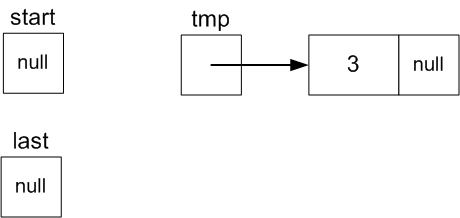
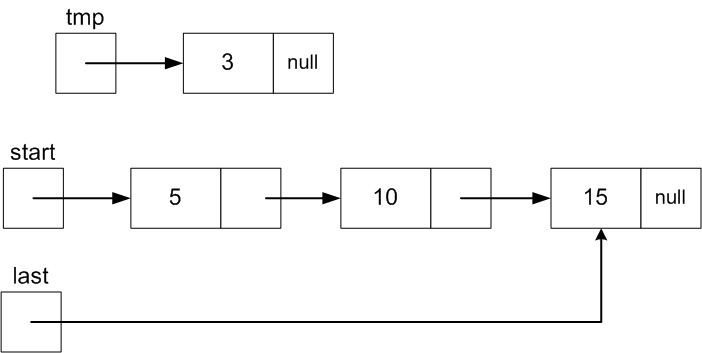
create a new Node with data value 3:
Node tmp = new Node(3);
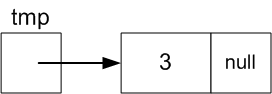
-
Make tmp.next referene the first node:
tmp.next
= start;
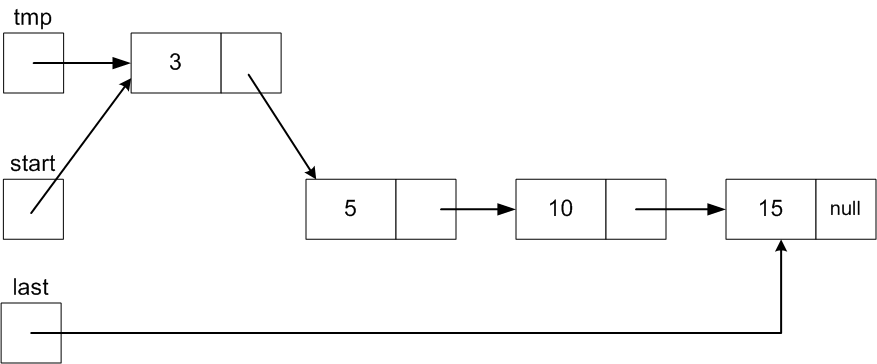
So tmp.next will
then reference the Node with value 5 just like start.
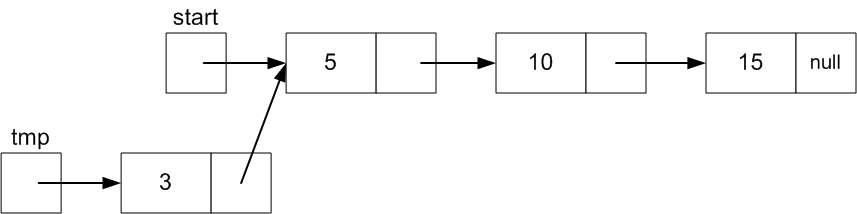
Finally, set start to point the Node that
tmp references since it is the new first
Node
start =
tmp;
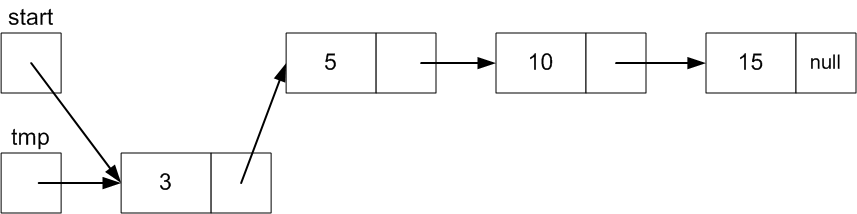
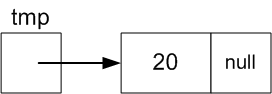
Adding a new value, say 20, after the current last value is
more work. We need to
- Create a new Node with value 20 (as we did with the adding 3
to the front)
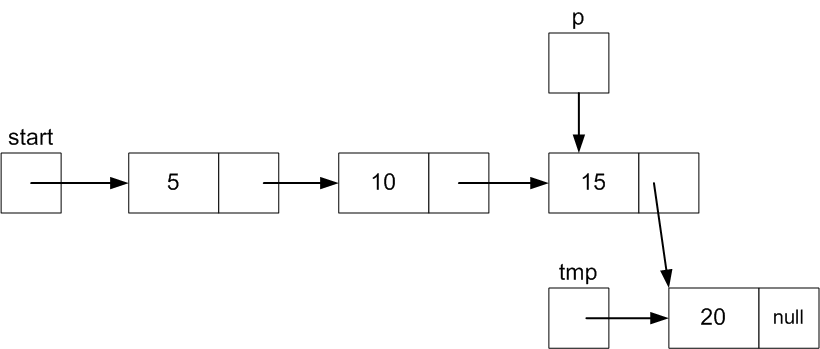
- Change the .next field of the Node with value 15 to
point to this new Node.
The problem is to get a reference to Node 15.
Node 10's .next works, but that means we need a
reference to Node 10, and so on.
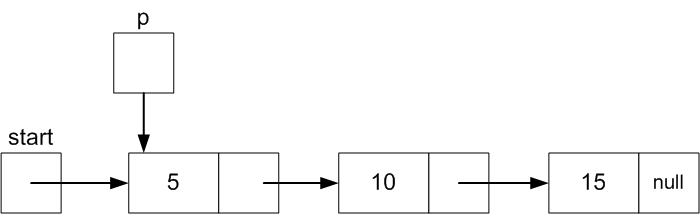
We have to begin with start.
Declare Node variable p and set it initially equal to
start.
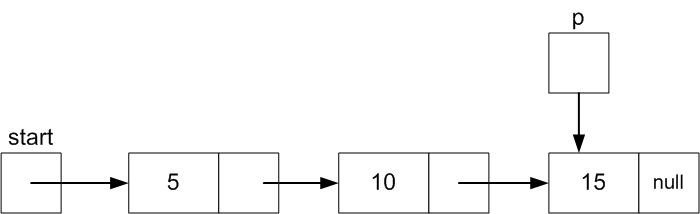
The keep updating p to point to the next Node
until it points to the last Node (15 in this case).
In general the last Node is the one whose .next field is equal
to null.
The complete code:
Node tmp = new Node(20);   // Create a Node for the new value 20
Node p = start;            // Have to begin at the first node

if ( p == null ) {         // start will be null if there are no Nodes yet
  start = tmp;             // If so, make start point to the new Node
} else {

  while( p.next != null ) {// Otherwise, keep moving p to the next Node
    p = p.next;            // until p points to the last Node (where .next is null)
  }
  p.next = tmp;            // Set the next field of the current last Node to the new Node
}
This version of add has complexity O(N), where N is the
number of data items in the list.
With a little more book keeping, we can avoid having to update
a Node variable, p, one Node at a time from the start Node to
get to a reference to the last Node.
In addition to start, maintain a Node variable
last that is null if the list is empty and
otherwise references the last data Node.
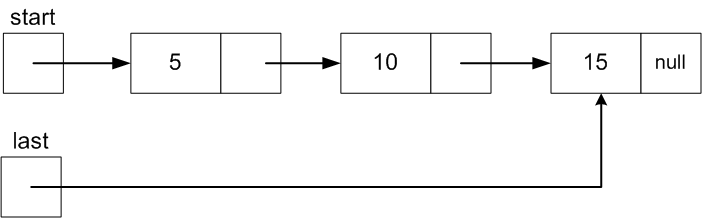
Making this change requires revising both the Add to Front and
Add to Last
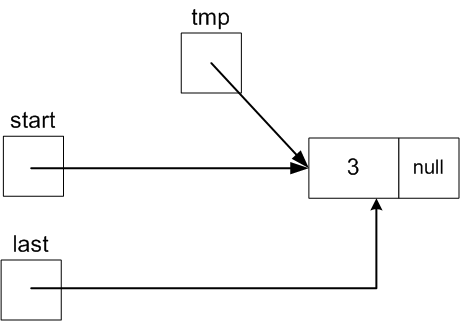
Here is the revised Add to First code for adding value 3 to the
front in pictures:
The complete code:
Node tmp = new Node(3);
tmp.next = start;
if ( start == null ) {
   last = tmp;
}
start = tmp;
It is easy to get this wrong by not updating last when
the list was empty!
The complexity of this version is O(1)
The revised Add to Last code is similar, but it is now much
more efficient than the initial version of Add to Last (The number
of operations is fixed and doesn't depend on the length of the list):
Node tmp = new Node(20);
if (last == null) {
   start = last = tmp;
} else {
  last.next = tmp;
  last = tmp;
}
Removing the first value and assigning it to a variable x is easy, but we have to be careful if
the list is empty or if it has only one data value:
public E removeFront()
{
  E x;
  if ( start == null ) {        // case 1: empty list
    throw new NoSuchElementException();
  } else if ( start == last ) { // case 2: only 1 element
    x = start.data;
    start = last = null;
  } else {                      // case 3: more than 1 element
    x = start.data;
    start = start.next;
  }
  return x;
}
(Draw a before and after picture for each of the cases!)
For remove last we run into another efficiency problem. For the
list below, start references the first Node (with data 3)
and last references the last Node (with data 15).
But to remove 15, we need a reference to the previous Node
(with value 10) so that last can point to it and its .next field can be set to
null.
We could write a loop to begin at start again and move a
Node variable p down to point to the next to last Node
(with value 10 in this case). But that would make the running
time of this operation depend on the current length of the
list.
We could do this, but a better idea is to be able to
move to the previous Node as well as the next Node just as i++ or
i-- lets us move to the next or previous index in an array.
private class Node
{
  public E data;  /* E declared in the containing class */
  public Node next;
  public Node prev;

  public Node(E d)
  {
    data = d;
    next = null;
    prev = null;
  }
}
Using doubly linked nodes can solve the problem of removing
the last element efficiently.
Using doubly linked nodes does a bit more code to update
both next and prev members instead of just next.
But both doubly linked lists as well as singly linked lists
have to be careful to handle boundary cases:
- adding an item to an empty list
- removing an item from a list with only one item
One addition to the structure will allow these boundary cases
to be handled with the same code as non boundary cases.
The change is to add two guard nodes: one at the beginning before the
first data node and the other after the last data node.
This has the benefit that every data node will have a
node before it and one after. In particular this
is true even for the first data node and for the last data node.
The head and tail nodes below are the guard
nodes:
Empty List: size 0
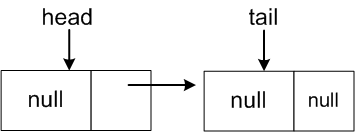
Non-Empty List: size 3

The revised Add to Front for a list of doubly linked
Nodes.
Add data value 3 to this list:

we have to
create a new Node with data value 3:
Node tmp = new Node(3);
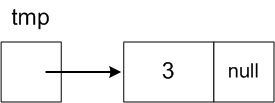
-
Make tmp.next reference the first node and tmp.prev
reference head:
tmp.next = head.next;
So tmp.next will
then reference the Node with value 10 just like
head.next.
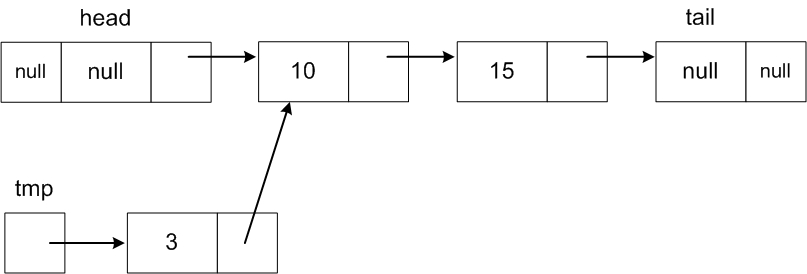
-
Now head.next should reference the new Node
head.next = tmp;
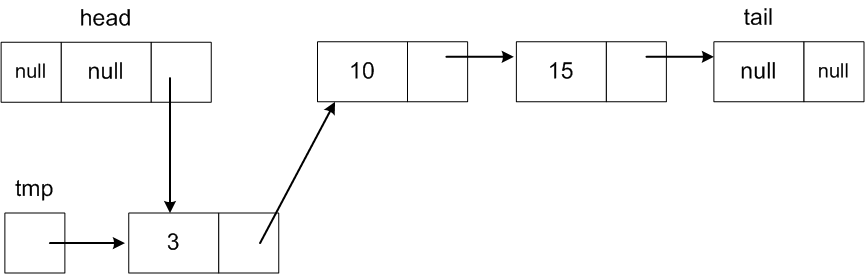
The code for this example that adds a new node to the front of
the list was:
    Node tmp = new Node(3);

    tmp.next = head.next;
    head.next = tmp;
Does this work for the boundary case where the list is empty??
This is a problem for a singly linked list whether we have
guard nodes or not.
What is needed is to change to doubly linked Nodes.
But this means we have to redo all the previous operations that
were already easy.
Although we are using both head and tail nodes,
adding to the front didn't have to explicitly reference
tail!
This makes it easier to write correct code than in the case
without guards.
Similarly, adding to the end doesn't need to explicitly
reference head.
Write the code for addLast(E x) method below for a
doubly linked list with 2 guard nodes - head and tail.
(Assume head and tail are members of the list class.)
E.g., addLast(20) should 20 to the end of this list:

to get

 public void addLast(E x)
{

}
This is just as easy and doesn't have to consider the case of
size() == 1 separately. The same code should work size = 0 as well
as for any size > 0.
Write the code for removeFront(E x) method below for a
doubly linked list with 2 guard nodes - head and tail. It should
return the element that was removed.
(Assume head and tail are members of the list class.)
E.g., removeFront() should 10 from this list:
to get

 public E removeFront()
{

}
This is just as easy and is left as an exercise.
public E removeLast()
{

}
Quite frequently it happens that a reference to a Node in a
doubly linked Node list will be available (it doesn't
matter how for the present discussion) and that Node is to be
deleted from the list.
For example, suppose a Node variable p is available
somehow that references Node with value 10 below.
Only the two links in red need
to change:
----->
<----- |
-- |
3 |
--
|
----->
<----- |
-- |
10 |
--
|
----->
<----- |
-- |
15 |
--
|
----->
<----- |
The code to delete Node p is easier to understand at first by introducing
variables to reference the previous Node with value 3 and
following Node with value 15.
These are the Nodes whose .next and .prev fields
need to change respectively.
Node before = p.prev;
Node after = p.next;

before.next = after;
after.prev = before;
----->
<----- |
-- |
3 |
--
|
----->
<----- |
-- |
15 |
--
|
----->
<----- |
or the Node names before and after
can be replaced by p.prev and p.next respectively
to get the very short code:
p.prev.next = p.next;
p.next.prev = p.prev;
The File class used in creating Scanner's, BufferedReaders,
etc. has some nifty methods:
- File[] listFiles() - If the name given to the File
constructor is a directory, this method returns an array of File
objects representing the files and subdirectories.
- String getName() - returns the String name of the file (or
directory)
- boolean isDirectory() - can you guess?
public class ListDirs
{
  private static PrintStream ps = System.out;


  public static void listAll(String dirName)
  {
    listAll(dirName, "+");
  }

  private static void listAll(String dirName, String prefix)
  {
    File f = new File(dirName);
    File[] entries = f.listFiles();

    for(int i = 0; i < entries.length; i++) {
      ps.printf("%s %s\n", prefix, entries[i].getName());
      if ( entries[i].isDirectory()) {
	listAll(dirName + "/" + entries[i].getName(),
		"   " + prefix);
      }
    }
  }

  public static void main(String[] args)
  {
    String dir;

    if ( args.length > 0 ) {
      dir = args[0];
    } else {
      dir = ".";
    }
    listAll(dir);
  }

}