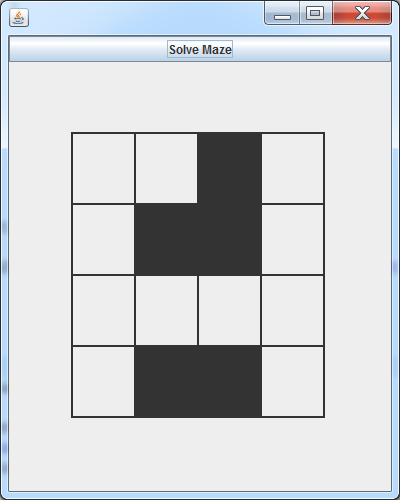
The problem is to write a program that can navigate through a maze from the starting point (upper left corner) to the exit point (lower right corner):
A stack type should allow insertions and deletions such that the item deleted is the last one inserted - last in, first out.
We might also want to know if the stack is empty and if not, to be able to examine the last item inserted.
The data type should be stored in the stack will not affect the stack operations.
So use a generic type variable, say E, for this data.
The UML diagram below gives the syntactic specification of the Stack class, but nothing about the actual meaning; i.e., the last-in, first-out property.
What is needed is additional documentation of the method properties.
| Stack<E> |
|---|
| .. private data .. |
|
+Stack() +void push(E x) +E pop() +E peek() +boolean isEmpty() +int size() |
/**
 * The Stack class represents a last-in, first-out data type.
 *
 * @author glancast
 */
public class Stack<E>
{
  /**
   * Creates an empty Stack
   *
   */
  public Stack()
  {}

  /**
   * Inserts an item on the top of this Stack.
   *
   * @param x the item to be inserted
   */
  public void push(E x)
  {}

  /**
   * Removes the last inserted item on the stack
   * and returns that object as the return value of
   * this method.
   *
   * @return The item removed from the top of the stack.
   * @throws NoSuchElementException if the stack is empty.
   */
  public E pop()
  {}

  /**
   * Returns the last inserted item on the the stack without
   * removing it.
   *
   * @return The item at the top of the stack.
   * @throws NoSuchElementException if the stack is empty.
   */
  public E peek()
  {}

  /**
   * Test if this stack is empty.
   * @return true if the stack is empty; false, otherwise.
   */
  public boolean isEmpty()
  {}

  /**
   * Get the number of elements in this stack.
   *
   * @return the number of elements
   */
  public int size()
  {}
}
We could use an array (with elements of the generic element type E) to store the elements of the stack.
But an array is fixed size, so it doesn't actually grow or shrink as items are inserted or deleted.
We could keep track of two things:
Then,
The last item will be at index sz - 1
The stack is empty if sz == 0
Insertion (push) just stores the item at position sz and then increments sz.
Deletion (pop) can copy the value at position sz - 1 to be returned. Then it can set this value to null, decrement sz and returns the copied value.
This can work, but the major problem is the size of the array. The push method cannot do its job if the array is full!
This can be overcome by using an ArrayList instead of an ordinary array since an ArrayList grows as needed when elements are added.
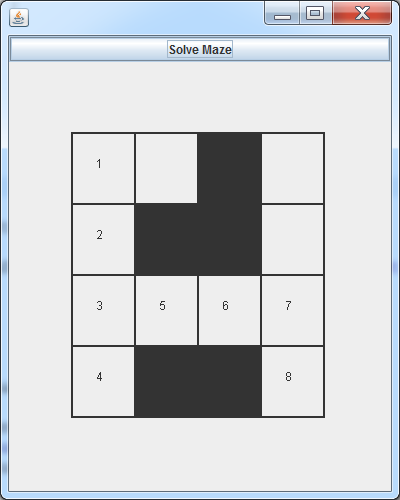
The problem is to write a program that can navigate through a maze from the starting point (upper left corner) to the exit point (lower right corner):
A possible solution outline:
Create a Stack to hold grid positions - Stack<Position>
Check that the starting position is not blocked!
Set the current position to the starting position and push each immediate neighbor on the stack provided that neighbor is not already marked.
While the current position is not the finish position and the stack is not empty
pop the top position off the stack
If the position is not marked, make it the current position, mark it and add its unmarked neighbors to the stack.
If current is NOT the finish position, there is no path from the start to the finish.
By using an generic ArrayList private member of the Stack class, we can easily implement all the Stack methods. (Details in the lecture example zip file.)
Each Stack method can be implemented simply usually by only invoking an appropriate ArrayList method on the private ArrayList member.
Why not just use an ArrayList instead of a Stack?
The ArrayList member will double in capacity if it gets full and all members must be copied to the ArrayList's new bigger capacity array.
It might be better to use a LinkedList member in Stack rather than an ArrayList.
If we did that, nothing would need to be changed in the Maze application since it would use the same push, pop, etc. methods.
JUnit provides a set of Java classes that facilitate testing class you build.
The basic method provided is a collection of overloaded versions of:
assertEquals(expected_expression_value, expression)
Instead of you writing code to check the return value of this method, JUnit checks and notes whether it fails or not.
You write as many test methods as you need in a separate class (e.g. class StackTest to test the Stack class).
Typical test methods use the assertEquals method. If assertEquals fails, that test fails and JUnit immediately goes on to the next test.
Finally, what about output?
You shouldn't care about any additional output if a test succeeds, only if it fails.
The JUnit code reports whether each test method succeeds or fails.
If a test method succeeds, JUnit doesn't report anything else about the method.
If a test method fails, it gives the statement that failed - typically an assertEquals call.
In the case of this kind of failure, JUnit also reports the expected value and conflicting expression value.
JUnit gives a backtrace to your class under test, so you can usually see which of your class methods led to the failure.
After that, you have to figure out how to fix the problem.
    1
    2	import java.util.NoSuchElementException;
    3	import static org.junit.Assert.*;
    4	import org.junit.Before;
    5	import org.junit.Test;
    6	import org.junit.runner.*; // for JUnitCore.main
    7
    8	/**
    9	 * JUnit class to test the Stack class
   10	 *
   11	 * @author Glenn Lancaster
   12	 */
   13	public class StackTest
   14	{
   15
   16	  private Stack<String> s;
   17
   18	  @Before
   19	  public void setup()
   20	  {
   21	    s = new Stack<String>();
   22	  }
   23
   24	  @Test
   25	  public void test1()
   26	  {
   27	    assertEquals(true, s.isEmpty());
   28	    assertEquals(0, s.size());
   29	    s.push("a");
   30	    assertEquals(false, s.isEmpty());
   31	    assertEquals("a", s.peek());
   32	    assertEquals("a", s.pop());
   33	    assertEquals(true, s.isEmpty());
   34	  }
   35
   36	  @Test
   37	  public void test2()
   38	  {
   39	    String[] x = {"a", "b", "c", "d"};
   40	    for(int i = 0; i < x.length; i++) {
   41	      s.push(x[i]);
   42	      assertEquals(i + 1, s.size());
   43	      assertEquals(x[i], s.peek());
   44	    }
   45
   46	    for(int i = x.length - 1; i >= 0; i--) {
   47	      assertEquals(x[i], s.pop());
   48	    }
   49	    assertEquals(true, s.isEmpty());
   50	  }
   51
   52	  @Test(expected=NoSuchElementException.class)
   53	  public void test3()
   54	  {
   55	    s.pop();
   56	  }
   57
   58	  public static void main(String[] args)
   59	  {
   60	    JUnitCore.main("util.StackTest");
   61	  }
   62
   63	}
Write a class BalancedApp with a static main method that will parse an input file to check that it has properly balanced curly braces, square brackets, and parentheses - '{', '}', '[', ']', '(', and ')'.
If 'x' stands for any character other than the delimiters, here are grammar rules for forming a properly balanced text:
S -> '(' S ') | '[' S ']' | '{' S '}'| S S | 'x'
For example, the input
[ ( { x x } x ) ] ( x )
can be generated by these rules, but
( x [ x ) ]
cannot!
The essential feature is that when a closing delimiter is encountered, it should be a match for the most recent opening delimter.
Using this fact ("most recent"), a stack holding the opening delimiters can be used:
When a character is read, just print it.
If the character is an opening delimiter, push it on the stack.
If the character is a closing delimiter, check that is a match for the top element of the stack (the most recent opening delimiter).
If there is a match, just pop the opening delimiter off the stack, otherwise the input is not balanced.
What if the stack is not empty after all the input has been read?
What if a closing delimiter is read, but the stack is empty?
(See hw2.)