While there are many similarities between developing database applications for traditional networks (LANs and WANs) and developing database applications for the Web, the latter requires the developer to consider additional issues when choosing the appropriate database development tools. LAN-based database tools rely on consistent connections; however, with Web database solutions, HTTP connections are stateless.
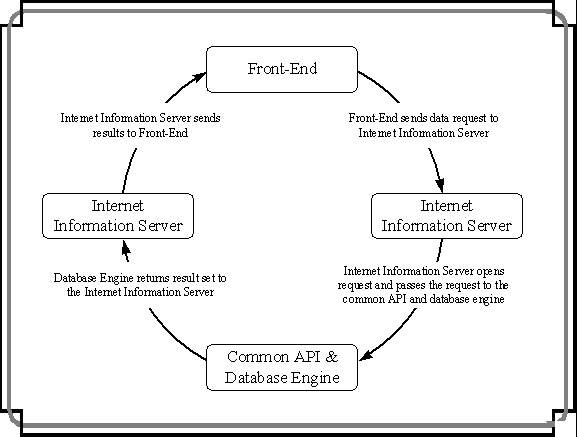
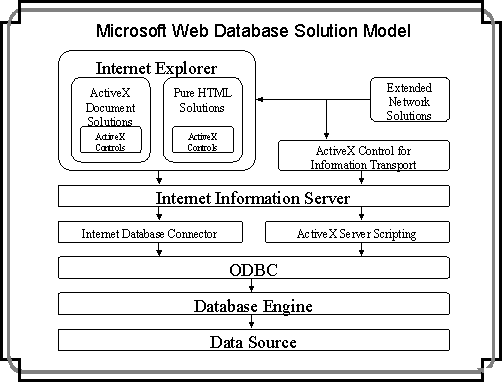
The illustration below provides a simplified model of Internet database applications and shows how the traditional model has been altered to provide functionality over the Web. The remainder of this section will provide an overview of this model and then discuss how various Microsoft database development tools fit into this model. Finally, there will be a brief discussion of two component technologies, ActiveX and Java, and their role in database development. Several additional Microsoft tools are referred to in this section. Overviews of each of these tools are provided in Appendix B.
Model Overview
As outlined above, there are three basic tools in Web database solutions: Internet servers, database engines, and front-end tools. Database engines and front-end tools were both discussed earlier in this paper (although front-end tools earlier in this paper were limited to Visual Tools). However, Internet servers are an additional consideration for developers when creating Web database solutions.
Internet Information Server (IIS)
An essential layer of any Web database solution is an Internet server. The Internet server transfers information sent between the front-end and the database engine. Microsoft IIS provides many features to facilitate database solutions. In particular, it can use the Internet Database Connector (IDC) as an easy-to-use method of passing requests to ODBC drivers, which in turn send information to the database engine.
Another feature of IIS that helps developers to streamline their solutions is the use of the Internet Server Application Programming Interface (ISAPI). ISAPI enables Web application developers to bypass the coding procedures required by the widely used Common Gateway Interface (CGI) standard. ISAPI offers the most efficient way to access external applications from a Web server. Rather than depend on CGI to link browsers to applications, ISAPI employs software drivers to frequently accessed BackOffice
™ applications within the Web server. Visual C++ can be used to increase the power of ISAPI and provides wizards for creating ISAPI server extensions and filters. ISAPI server extensions and filters are DLLs that intercept specific server events and perform appropriate actions.
Additionally, through the use of ActiveX Server Framework
14, developers can further extend their Web database solutions. ActiveX Server Framework includes server scripting, a technology that enables IIS to invoke Automation servers, which can be written using Visual C++, Visual Basic, and Visual FoxPro.
ActiveX Server Framework is leveraged by "Internet Studio" and by Microsoft Access (through the Publish to the Web Wizard). It ships with a Database Connector server side object that enables solutions to access ODBC data sources. Furthermore, the ActiveX Server Framework Database Connector allows users to retrieve and update records on a remote database. This powerful feature can be used to greatly enhance Web database solutions and can easily be integrated into a Web application using Visual Basic Script or another active server scripting engine.
Database Engine
Under the Web paradigm, there is still the need for both a user interface and a database engine. In fact, the functionality of the database engine remains largely unaltered. The database engine still receives queries for data and returns results to the client. Nevertheless, each of the three Microsoft database engines (FoxPro, Microsoft Jet, and SQL Sever) has strengths that make it particularly strong for certain types of Web database solutions. The strengths of each engine in a traditional setting carry over to the Web database paradigm. Below, three basic Web scenarios are addressed.
·
High Volume Internet Database Solutions
As with a solution on a traditional network, SQL Server is the best tool for a solution to handle a high volume of transactions or queries over the Internet, due to its abilities in logging and rolling back transactions. Furthermore, if the developer is creating an electronic commerce solution, the SQL Server security features will make it the best database engine for the job.
·
Specialized Internet Solutions
Specialized Internet solutions are solutions that experience reduced traffic; even though a specialized Internet solution is available to the world, it is only of interest to a small audience (for example, a Web site for a local chamber of commerce). The Microsoft Jet database engine and the FoxPro engine will generally be the best choice for these solutions. They are relatively easy to administer and provide excellent performance with low to moderate numbers of users.
·
Intranet Database Solutions
Intranet database solutions are similar to LAN-based database solutions. The corporate intranet can be though of as being just another type of network. Decisions as to the appropriate engine for intranets should be made based on criteria from the "Database Engine Questions" section above.
Front-End
Microsoft provides a number of tools to create front-ends for Web database solutions. Developers will select their tools based on the needs of their users and the nature of the solution. Web-based front-end solutions can be placed into three categories: pure HTML solutions, extended network solutions, and hybrid solutions. Each of these categories is discussed briefly below, as are the tools that can be used to implement such solutions.
Pure HTML Solutions
Overview
On the Web, the user interface frequently consists of an HTML document, which is then viewed through a Web browser15 (for example, Microsoft Internet Explorer, Netscape Navigator, and so forth). HTML documents can be created with some of the Microsoft Visual Tools or through a Web authoring tool (for example, Microsoft FrontPage™ Web authoring and management tool, Microsoft "Internet Studio", and so on).
In a pure HTML solution, the user interface (that is, the HTML document) sends a query parameter to the Internet server (for example, Microsoft Internet Information Server); subsequently, the Internet server uses a database connector to submit the query to the database engine.16 The database engine returns the results through the database connector to the Internet server, which, in turn, creates a new HTML document with the formatted results of the query and sends the dynamically constructed HTML document to the Web browser.
Strengths and Weaknesses
One key advantage of pure HTML solutions is that they can be accessed by anyone who has an HTML browser, and, thus, they are browser and platform independent. Since these solutions are platform independent, developers only need to develop one version of their solution, thereby greatly reducing costs. One weakness of pure HTML solutions is that HTML cannot generally duplicate all of the functionality present in traditional front-end solutions developed with any of the Visual Tools. Thus, database developers seeking to maximize reach while minimizing solution costs should use pure HTML solutions.
Choosing the Appropriate Tool
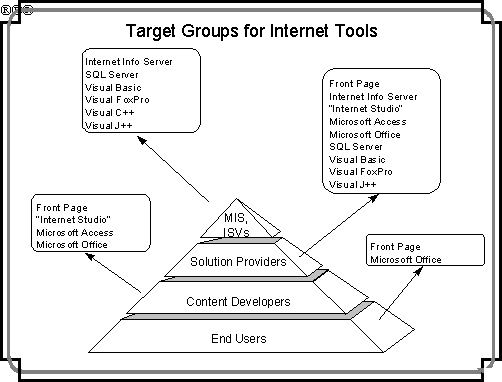
If a developer is seeking to build a basic Web solution quickly and cheaply and is already familiar with Microsoft Access or Visual FoxPro, both of these Visual Tools would be good choices for building the HTML documents. Likewise, if a developer is seeking to expand the functionality of an existing Visual FoxPro or Microsoft Access solution to the Web, in most circumstances these two Visual Tools should be used. Microsoft Access provides the Publish to the Web Wizard, which allows developers to convert their Microsoft Access solutions to HTML documents. Through this Microsoft Access wizard, database developers can either provide static HTML solutions or create dynamic solutions, using either the IDC or the Active Server Framework. Visual FoxPro converts its solutions to HTML through its Internet Search Wizard.17
However, if additional functionality and/or controls (for example, buttons, drop-down lists, and so forth) are required in the HTML document or the solution is not associated with an existing Microsoft Access or Visual FoxPro solution, "Internet Studio" or Microsoft FrontPage, or some combination of the two, will be the best tool for the solution. If the database developer is unfamiliar with building advanced Web solutions, as with any development tool, some time will be required to come up to speed on "Internet Studio". "Internet Studio" is especially well tuned for Web database solutions and provides an intuitive means of building solutions that access the ODBC data access component of the Active Server Framework.
Extended Network Solutions
Overview
In an extended network solution, the front-end of the solution is not associated with a browser; thus, the Web is used for two purposes: to send requests for data and to return results. The user interface is placed on the user's desktop, and query results are merely incorporated into this interface. Extended network solutions also communicate with the database engine through an Internet server.
Strengths and Weaknesses
Extended network solutions are an excellent alternative for developers who want to provide database access to a small audience, dispersed over multiple networks. Furthermore, extended network solutions offer an excellent alternative for database developers who want to expand the reach of their existing database solutions. For these types of solutions, the user requires a full, functional copy of the front-end application on their desktop computer; thus, extended network solutions are especially appropriate when users will need to use the solution on a regular basis. The drawback, of course, is that solutions cannot be constantly updated, as they can in both pure HTML and hybrid solutions, due to issues such as download time and client coordination.
Nevertheless, once on a user's desktop computer, the front-end of a extended network solution can access information extremely quickly over the Internet, since there is generally no wait time for objects such as graphics files and controls. This type of solution is an excellent alternative for intranet solutions, where the corporation controls the applications present on a user's computer. In short, extended network solutions should be used in Web database solutions for limited-size audiences who require data access speed and who will use the solution multiple times.
Choosing the Appropriate Tool
The choice of the appropriate tool for an extended network solution can be determined by using the "Visual Tool Questions" section above.
ActiveX Document Solutions
Overview
Through the use of ActiveX technologies, Microsoft has created a third powerful way to create Web solutions: ActiveX documents. ActiveX documents enable users to open files, complete with native toolbars, menus, and all other user interface elements, from within Microsoft Internet Explorer. The browser simply becomes the frame in which users can open and use richly formatted documents (such as Microsoft Excel spreadsheets and Word documents) or custom applications (such as Visual Basic solutions) right inside their Web browser.
In order for an ActiveX document such as a Microsoft Excel or Word document to run, a copy of the respective parent application must be present on the user's desktop computer. Likewise, for an ActiveX document such as a Visual Basic executable file to run, a copy of the Visual Basic run-time library must be available on the user's computer.
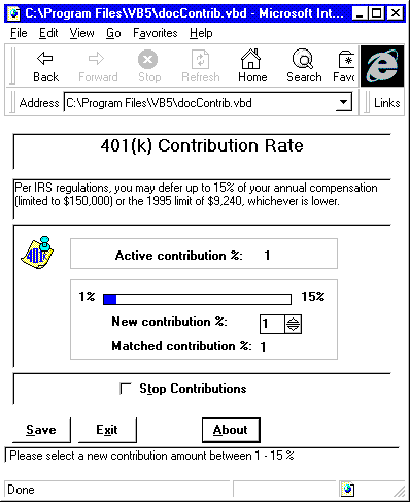
The screen shot below shows how the ActiveX document technology could support a Visual Basic database solution. In this solution, a Visual Basic front-end is embedded in the Microsoft Internet Explorer browser. Links are maintained with an employee database, which tracks each employee's 401K contributions.
Strengths and Weaknesses
By using ActiveX document solutions, developers can create Web database solutions with all the power and flexibility of traditional network solutions. This type of solution is particularly practical on corporate intranets; in this situation, the corporation knows which applications are available to its employees and can thus ensure that everyone can utilize the solution. Furthermore, ActiveX document solutions can often offer a low cost means of providing content on an intranet, as it allows employees to post intranet solutions with tools they already know (for example, Visual Basic, Visual FoxPro, Microsoft Excel, Microsoft Word, and so forth).
ActiveX document solutions are limited by the tools available to their users. For example, without a Visual Basic run-time library on the user's computer, Visual Basic-based ActiveX documents will not run. Thus, this type of solution is not the best approach for database developers who want to reach an extremely wide, uncontrolled audience. However, ActiveX documents are an excellent choice when the audience is well defined and the database developer wants to create a highly interactive solution.
Choosing the Appropriate Tool
The choice of the appropriate tool for this type of solution can be determined by using the "Visual Tool Questions" section above.
Components in Database Solutions
Adding components to Web database solutions, such as ActiveX controls and Java applets, is a means by which developers can enhance their solutions. Components can be accessed by both the front-end and Internet server in Web database applications, performing functions such as database table navigation, mathematical computation, and report design.
ActiveX controls are discussed briefly in the "Visual Tool Questions" section above. These powerful controls can be built with Visual J++ development software, Visual C++, and Visual Basic.
In addition to creating ActiveX controls, Visual J++ can be used to create Java applets. A Java applet is a Java program that can be included in an HTML page. When a user browses an HTML document with an attached Java applet, the applet's code is transferred to the user's system, compiled, and executed by the browser. Java applets will run on any platform where there is a Java Virtual Machine (VM) exposed through the browser.
14
For more information on ActiveX Server Scripting, see Appendix A: Microsoft Internet Technologies and Tools.
15
For more information on Microsoft Internet Explorer, see Appendix A: Microsoft Internet Technologies and Tools.
16
For more information on ActiveX Server Scripting, see Appendix A: Microsoft Internet Technologies and Tools.
17
Visual FoxPro also provides its own Internet server, a Visual FoxPro executable application that runs in the background. When it receives a query from the Web page through the CGI script, the Visual FoxPro Information Server runs the transmitted query and sends the results back in an HTML document.