About JRun Servlet Runner
JRun is a free application that is supplied by Live Software. JRun is a Web server extension that allows many industry-leading servers to become 100 percent servlet API-compatible and, most importantly, invoke servlets. JRun is necessary, because the PWS Web server does not have support for Java servlets.
JRun consists of native code, which provides an interface between the Web Server and the servlets being invoked. JRun adheres to the JavaServer architecture and implements the Java servlet API. this allows you to write servlets and not know (or care) in which environment they will be invoked -- this fulfills the "write once, run anywhere" promise of Java.
Since the Live Software is giving the product away for free, it opens the door for developers to create and deploy servlets using Web servers that are already in production.
JRun supports the following server types...
- Apache (Win95, NT/Intel, Solaris, AIX, IRIX, HPUX, Linux)
- Apple's AppleShare IP (MacOS 8.x)
- Microsoft Active Server Pages (ASP) (Win95, NT/Intel)
- Microsoft Internet Information Server (IIS) (NT/Intel, NT/Alpha)
- Microsoft Personal Web Server (PWS) (Win95)
- Netscape FastTrack & Enterprise Servers (Win95, NT/Intel, NT/Alpha, Solaris, AIX, IRIX, HPUX)
- O'Reilly & Associates' WebSite (Win95, NT/Intel) (JRun bundled with the server)
- Star Nine's WebStar (MacOS 8.x) (JRun bundled with the server)
JRun Administration
JRun was written to closely represent the Java Server Architecture, and because of this, it has many similarities to the Java Web server. First of all, the General Settings (see image below) defines the JRun Root Directory. This is the location that JRun was installed, and points to where the ISAPI is located. The second setting is the Default Servlets directory. This directory points to where the servlets are being stored on the Web server. This is very important, because this defines where you should place your servlets so that they are run by JRun. The default directory simply lists /servlet. This refers to the program default directory where sample files reside. The default logging directory and single threadmodel pool size are defaults and do not need to be changed.
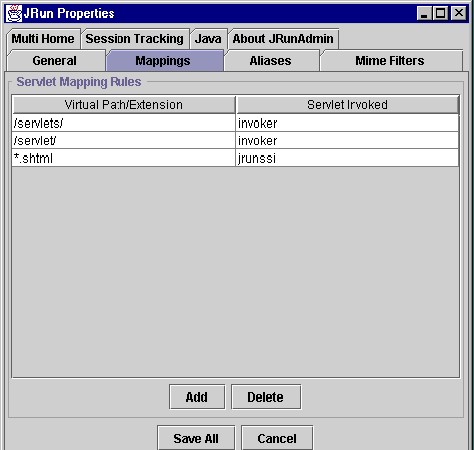
The next administration screen that is some great importance is the Servlet Mappings (see image below) administration screen. This screen allows you to define prefix and suffix mappings for your servlets.
A prefix mapping allows you to specify a given servlet be invoked whenever a request contains a particular prefix. For example, if a browser made a request - http://www.domain.com/foobar - and you have a prefix mapping of "/foobar" set up to invoke the foobar servlet, then the foobar servlet would be invoked. Any information after the prefix will be passed on to the servlet.
Suffix mappings allow you to specify that a given servlet be invoked whenever a request contains a particular file extension. This is how server-side includes are invoked.
There are several other administration configuration pages that are included with JRun. In our project, it was not necessary to modify any of these other settings that came with the JRun. I will list them and give a brief description of what these settings are.
Servlet Aliasing allows you to create an alias for a commonly used servlet, to create a nickname for a servlet with a lengthy name, or to force the invocation of servlets when a certain file name pattern is encountered.
Mime Filters allows you to manage the list of servlet-to-mime type mappings. A mime type is a way to determine the contents of a file; thus, you can map a particular servlet to a particular mime type.
JRun supports multiple server hosts by allowing you to specify alternate servlet and log file directories. For example, you could have www.hosta.com point to one directory for servlets and logs, and www.hostb.com point to another directory for servlets and logs on the same server.
The Session tracking and Java configuration pages list other configuration settings like timeouts and stack sizes.