
SQLJ: The 'open sesame' of Java
database applications
Researched by : Ching Lui
Table of Contents:
Overview
Oracle and a number of its partners namely IBM, Tandem, Sybase, and JavaSoft are working to establish SQLJ as a standard way to embed SQL statements in Java programs. SQLJ offers a much simpler and more productive programming API than JDBC to develop applications which access relational data, and which can communicate with multi-vendor databases using standard JDBC drivers. SQLJ will provide a very easy to use way with which to develop both client side and middle-tier applications that access databases in Java, and to define stored procedures, functions and triggers within the database server in Java.
SQLJ stands for Embedded SQL in Java. SQLJ is similar to the ANSI/ISO "Embedded SQL" standards, which prescribe how static SQL is embedded in C, COBOL, FORTRAN, and other languages. For example, Oracle's pre-compiler product PRO*C is an implementation of the Embedded SQL standard in the host language C. Those familiar with the Oracle pre- compilers may think of SQLJ as if it were "PRO*Java".
SQLJ is a new standard for embedding SQL within Java. This seamless integration of SQL into Java opens new doors in terms of program development, manageability, and performance. Used in conjunction with JDBC, the de facto standard for Java database access, SQLJ has enabled Java to go where it has never gone before!
SQLJ Standard
Oracle, IBM, Sybase, Compaq, Informix and Javasoft and a number of other leading industry partners are all cooperatively
developing a common standard to integrate Java and SQL providing customers a HIGHLY PRODUCTIVE, OPEN, MULTIVENDOR
solution to build enterprise applications in Java.
By ensuring interoperability between their SQLJ products, the partners want to offer customers the ability to develop
applications in Java that can be transparently moved from one database platform to another. The portability allows
SQLJ applications executing in a client environment [either fat or thin clients], middle-tiers [such as Java web
servers or application servers], or database stored procedures and triggers implemented in SQLJ to be moved seamlessly
between compatible implementations from many different vendors and is consistent with Java's philosophy of write-once
run-anywhere.
SQLJ was developed to complement the dynamic JDBC SQL model with a static SQL model. Unlike the ODBC and JDBC dynamic models, the static model provides strong type checking at application translation time, better manageability of data access through separation of package owner from package runner, and because all SQL is compiled, a vehicle for better performance.
The SQLJ Standard consists of three parts:
Part 0 - The SQLJ Language Specification
Provides standard language syntax and semantics for embedding static SQL in Java program. There are only two access
models for Java applications and applets: JDBC for dynamic access and SQLJ for static access.
Part 1 - The Stored Procedure Specification
Provides standards for implementing database stored procedures and functions in Java. This will allow customers
who have written stored procedures in Java to easily migrate them between databases. SQLJ offers portability at
two levels: First, Java source for stored procedures can be moved from one vendor’s platform to another; second,
compiled Java classes [Java bytecodes] from translated SQLJ programs can be moved to any compatible SQLJ platform
and executed regardless of which platform did the original translation.
Part 2 - The Stored Java Class Specification
Addresses standard ways to store Java datatypes and classes as objects in a database.
SQLJ has been accepted as an ANSI standard (ANSI X3.135.10-1998). This was a significant milestone for the Java
language for two reasons:
- It provides integration of SQL and Java, thus reinforcing the adoption and use of Java for enterprise data-intensive applications.
- It represents a landmark in multivendor cooperation and support for standards-based application development.
SQLJ is similar to the ANSI/ISO Embedded SQL standards, which prescribe how static SQL is embedded in C, COBOL,
FORTRAN, and other languages. When writing an SQLJ application, a developer writes a Java program and embeds SQL
statements in it, following certain standard syntactic rules that govern how SQL statements can be embedded in
Java programs. The developer then runs an SQLJ translator, which converts this SQLJ program to a standard Java
program, and replaces the embedded SQL statements with calls to the SQLJ runtime. The generated Java program is
compiled, using any Java compiler, and run against a database as illustrated below.
Figure 1. SQLJ-Java conversion
Benefits of SQLJ
SQLJ primarily is a productivity environment that gives Java developers a quick and easy way to use SQL directly in their Java applications without the tedium of having to do database programming. SQLJ is an excellent choice for static SQL programming tasks, and many SQL applications are static in nature. However, SQLJ does not handle dynamic SQL actions determined at runtime of the application; JDBC must be used to handle dynamic SQL.
Compact and high-level interface: SQLJ provides application programmers with a higher level interface resulting in more compact and error free code than JDBC for static SQL. SQLJ does not address dynamic SQL - users can however combine both SQLJ and JDBC in a single application to address both static and dynamic SQL respectively.
You can see the difference in the number of lines of code by comparing the following examples showing an update from a query result.
The first is the SQLJ example:
#sql iterator SeatCursor(Integer row, Integer col, String type, int status);
Integer status = ?;
SeatCursor sc;
#sql sc = {
select rownum, colnum from seats where status <= :status
};
while(sc.next())
{
#sql { insert into categ values(:(sc.row()), :(sc.col())) };
}
sc.close();
And here's the JDBC example:
Integer status = ?;
PreparedStatement stmt = conn.prepareStatement("select row, col from seats
where status <= ?");
if (status == null) stmt.setNull(1,Types.INTEGER);
else stmt.setInt(1,status.intValue());
ResultSet sc = stmt.executeQuery();
while(sc.next())
{
int row = sc.getInt(1);
boolean rowNull = sc.wasNull();
int col = sc.getInt(2);
boolean colNull = sc.wasNull();
PreparedStatement stmt2 = conn.prepareStatement("insert into categ
values(?, ?)");
if (rowNull) stmt2.setNull(3,Types.INTEGER);
else stmt2.setInt(3,rownum);
if (colNull) stmt2.setNull(4,Types.INTEGER);
else stmt2.setInt(4,colnum);
stmt2.executeUpdate();
stmt2.close();
}
sc.close();
stmt.close();
Translation-time syntax and semantic checking of SQL statements: For static SQL, the SQLJ translator performs
type-checking and schema-checking to detect syntax and semantic errors in SQL statements at program development-time
rather than runtime. Programs written in SQLJ are therefore more robust compared to JDBC programs are much easier
to maintain. Also, unlike JDBC, SQLJ permits compile-time checking of the SQL syntax, of the type compatibility
of the host-variables with the SQL statements in which they are used, and of the correctness of the query itself
with respect to the definition of tables, views, stored procedures, and so on, in the database schema. It should
be pointed out again that SQLJ and JDBC are complementary because SQLJ supports static SQL only. To perform dynamic
SQL operations from a SQLJ program, you still must use JDBC.
SQLJ is comprehensive: It provides embedded SQL syntax to simplify database access for a variety of different
facilities. These include transaction management, queries, DDL statements, DML statements, and stored procedure
and function calls. These procedures and functions could be written in Java, C, C++, or any other language supported
by the database. Languages specific to a database, such as Oracle's PL/SQL, can also be used. Let's look at a stored
procedure example using PL/SQL:
#sql { CALL PROC() };
In the example above, PROC is the name of the existing stored procedure defined in Oracle PL/SQL:
CREATE OR REPLACE PROCEDURE MAX_DEADLINE (deadline OUT DATE) IS
BEGIN
SELECT MAX(start_date + duration) INTO deadline FROM projects;
END;
This procedure reads the table called "projects" in the database, looks at the start_date and duration
columns, calculates start_date plus duration in each row, then takes the maximum start_date + duration total and
selects it into deadline, which is an output parameter of type DATE. In SQLJ, you can call this MAX_DEADLINE procedure
as follows:
java.sql.Date maxDeadline;
...
#sql { CALL MAX_DEADLINE(:out maxDeadline) };
In short, SQLJ offers developers substantial benefits for static SQL applications. Use of SQLJ reduces the number
of written lines of code and performs type and schema checking earlier in the development cycle for improved quality
and productivity. At the same time, it opens up the richness of SQL for data manipulation to the Java language.
Developers now truly have a choice of using Java, C, or any other programming language to develop the logic for
their database applications.
Besides productivity, SQLJ offers a second major benefit -- increased portability. SQLJ applications were designed to be vendor-independent in three important ways: First, the SQLJ syntax is designed to be database-neutral, and the SQLJ translator makes minimal assumptions about the SQL dialect. Second, the consortium members share a common SQLJ translator reference implementation. Third, the SQLJ-generated code and runtime are standard. A SQLJ program can access any data server for which a SQLJ runtime implementation exists. Since the default implementation of the SQLJ runtime performs database access using JDBC, a SQLJ program can access any data server for which JDBC drivers are implemented.
By ensuring interoperability between SQLJ implementations, the standard offers users the ability to develop applications in Java that can be transparently moved from one database platform to another. The code generated by the SQLJ translator is 100 percent standard Java code that can be executed in any standards-compliant Java virtual machine (JVM). This means that compiled Java classes (Java bytecodes) from translated SQLJ programs can be moved to any compatible SQLJ platform and executed regardless of which platform initiated the original translation. This allows SQLJ programs to be partitioned easily across different tiers in a distributed architecture and deployed in many different environments without any code changes.
The SQLJ runtime environment is vendor-neutral also. SQLJ's runtime environment consists of a thin layer of pure Java code that communicates with the database server across a call-level API.
A SQLJ implementation can use JDBC or any other interface as its runtime environment. Furthermore, a SQLJ implementation using JDBC is not restricted to any particular database vendor's JDBC driver. For example, the Oracle JDBC driver can be used with a JDBC-ODBC bridge to communicate with another vendor's database. This portability is consistent with Java's write-once, run-anywhere philosophy.
The SQLJ standard also allows vendor-specific customizations - a binary SQLJ application includes a set of SQLJ profiles that describe the SQL operations appearing in the original program source. These profiles can be used to create vendor-specific customizations that can be installed into the binary SQLJ application. Two types of customizations are possible: First, profile customizations to improve SQL execution performance using optimization techniques. Second, customizations to grant access to vendor-specific features not otherwise available to SQLJ programs. Multiple customizations can be installed into the same SQLJ binary, so that the same binary can be used to execute SQL on databases from different vendors, and the execution of that operation will take advantage of the customization available for each vendor.
The code generated by the SQLJ translator is 100% standard Java code and can be executed in any standards-compliant Java Virtual Machine. This allows SQLJ programs to be partitioned easily across different tiers in a distributed architecture, and deployed in many different environments without any code changes.
The followings are a few examples of SQLJ deployment configurations:
SQLJ for Client-Server Java Applications
SQLJ can be used with Oracle’s JDBC/OCI driver in a traditional two-tier client-server using SQLJ in combination with Oracle’s JDBC/OCI Driver. The Java application makes calls to the SQLJ library which in turn translates calls via the JDBC/OCI driver across SQL*Net to communicate with Oracle Database Server. In this configuration, users will need to deploy the following libraries on each client:
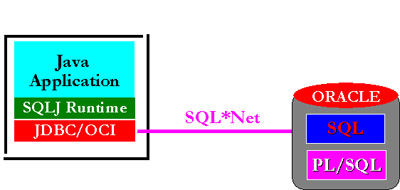
Figure: Using SQLJ in a two tier configuration
- SQLJ Runtime Library
- JDBC/OCI Driver
- Oracle Client Libraries including OCI, SQL*Net and CORE libraries
SQLJ for Multi-tier Applications
In a 3-tier configuration, a browser-based client communicates with a Java-based middle tier either using a
stateless protocol such as HTTP today or a stateful protocol such as IIOP in the future. The middle tier in turn
executes the Java application logic written in SQLJ and communicates with the back end database server. The following
diagram indicates how SQLJ can be used in combination with Oracle’s JDBC/OCI Driver in a three-tier configuration
either in an Intranet setting or an Extranet setting [where the web server is located behind the firewall].
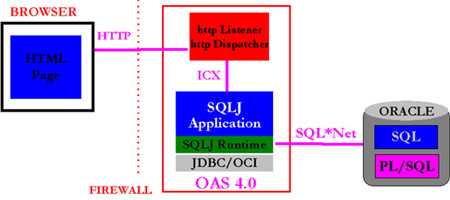
Figure: Using SQLJ in a three tier configuration
The client is a web browser that communicates with the web server using the HTTP protocol. The Java application
[the executable], the SQLJ runtime library, the JDBC/OCI driver, and the OCI, CORE and SQL*Net libraries are installed
on the web server. The user can start/invoke the Java application in a number of different ways: The user can use
a CGI script, Oracle’s Web Request Broker API [if the application is deployed on Oracle’s Web Application Server],
or even an IIOP style invocation. Once the Java application has been invoked, it communicates with the backend
database server using SQL*Net.
There are three important deployment issues that arise from this form of application deployment - how to manage
application state, how to improve the scalability of the application, and how to optimize application responsiveness.
Users are directed to Oracle’s JDBC technical white paper which discusses these issues in considerably greater
detail.
SQLJ for Java Applets
SQLJ programs may be run as Java applets - Java applets execute in a browser and therefore cannot require any
client-side installation. From the browser, the user simply clicks on a Uniform Resource Locator (URL) in a HTML
page that contains a Java applet tag. When the user loads the page, the Java applet (which can be a translated
SQLJ program), the SQLJ runtime library (which is 100% Java), and the necessary JDBC driver are downloaded into
the browser from the web server. Once they are in the browser and begin executing in the browser’s Java VM, the
compiled SQLJ code establishes a connection with the database server via the JDBC driver. Since it needs to be
downloadable along with the Java applet and the SQLJ runtime library, the JDBC Driver also needs to be a pure Java
implementation. It also needs to be relatively small in size so that it can be downloaded quickly and execute in
a performant manner on browser-based Java VMs.
Oracle’s SQLJ Runtime and the Thin JDBC driver have been designed explicitly for such implementations. By eliminating
the need for a client-side installation, Oracle’s downloadable SQLJ Runtime and its Thin JDBC driver reduce the
costs associated with maintenance and administration in an Intranet environment. They are even better suited for
Extranet applications where client-side installations preclude the universal access that is fundamental to the
success of the worldwide web. The following diagram shows the typical configuration in which the SQLJ Runtime and
the Thin JDBC driver can be used with Java applets. The Java applet, SQLJ runtime library and Thin JDBC are downloaded
into the browser after the user opens a URL. The SQLJ application communicates directly with the database server
using SQL*Net. The web server and the database server can be on physically separate machines or on the same machine.
In an Intranet deployment the entire configuration is behind a firewall; in an Extranet deployment, the web server
and the database are both behind the firewall.
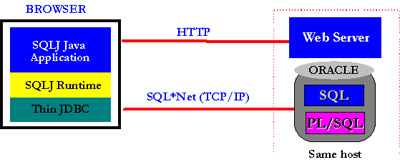
Figure: Using SQLJ with thin clients
The deployment configuration described above raises three important issues - how to handle Java security, how to
manage application state, and how to support large numbers of browsers connecting in this two tier configuration.
These issues are discussed in considerably greater detail in Oracle’s JDBC Technical Whitepaper to which the user
is referred.
Resources
http://www.javaworld.com/javaworld/jw-05-1999/jw-05-sqlj.html
http://www.oracle.com/java/sqlj/index.html
http://www.oracle.com/java/sqlj/standards.html
http://www.oracle.com.sg/st/products/jdbc/sqlj/index.html
http://www.software.ibm.com/data/db2