SE 450 Fall 2001/2002
Week 9 Lecture Notes
Networking Basics
-
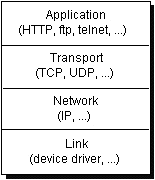
Basic TCP/IP Stack
Java Networking(java.net.*)
-
URLs (Uniform Resource Locators) - address of a resource on the Internet
-
2 parts:
-
Protocol - the part before the :// (ie http, ftp, ...)
-
Resource name - the part after the :// (ie www.depaul.edu/index.html, www.sun.com, ...)
-
Create URL's with the java.net.URL class (be careful becuase the constructor
can throw a MalformedURLException)
-
Example - Read from URL's by getting an InputStream (getInputStream()).
Sockets
-
Sockets are the end points of communication between clients and servers.

-
2 types of sockets:
-
Server sockets - listen on a specific port for incoming communication
requests
-
Client sockets - used by clients to initiate and propagate communication with
a server.
-
Sockets are bound to port numbers (16 bit numbers).
-
How do you establish a socket connection between a client and a server??
-
The server listens to a socket for a client to make a connection request
-
The client knows the host name of the server and the port number to which the server is connected.
The client sends a request to the server
-
The server gets a new socket bound to a different port (it needs a different
port so it can continue to listen for other connection requests at the original port)
-
The port number for the new connection does not need to be specified. The server and client will
work it out.
-
The client is notified that the connection has been established
-
Client and server communicate via InputStream/OutputStream that they get from the
sockets.
-
Server example code
try{
ServerSocket s = new ServerSocket(port);
while(true){
Socket incoming = s.accept();
PrintWriter pw = new PrintWriter
(new OutputStreamWriter(incoming.getOutputStream()));
// ... do something ...
pw.close();
incoming.close();
}
} catch (Exception e){}
-
Client example code
try{
Socket s = new Socket(host, port);
BufferedReader br = new BufferedReader
(new InputStreamReader(s.getInputStream()));
// ... do something ...
br.close();
s.close();
} catch (Exception e){}
-
Examples - Echo Server,
Echo Client,
Multi-threaded Echo Server,
Broadcast Server
Remote Method Invocation (RMI) Overview
-
Simplification of the distributed programming model for distributed applications.
-
Allows 2 object that reside on different machines (or different virtual machines)
to act as if they were on the same machine (ie via method calls).
-
2 major parts (p 435 in Jia):
-
Client
-
Get reference to remote object - actually a reference to the stub for the
remote object, not the actual object itself
-
Call methods on the remote object
-
Clients can treat remote object just like local objects
-
Can be passed as arguments to method calls
-
Can be cast using the same syntax
-
Can use instanceof operator to test them
-
Server
-
Create remote object(s) - these must implement java.rmi.Remote marker interface
-
Make them available to clients using RMI registry via registration
(rmi://host:port/nameOfObject)
-
Service method calls from clients
Remote Method Invocation (RMI) Details (p 435 in Jia)
-
6 steps of a RMI method call to server.m() by client
-
Client calls stub.m() - stub is code located on the client machine
-
Stub marshals arguments and sends them to the skeleton on the server machine
-
Skeleton unmarshals arguments and invokes server.m()
-
Object on server executes method m() and returns results to skeleton
-
Skeleton marshals results and returns them to the sub
-
Stub unmarshals the results and returns them to the client
Using RMI
-
Define interface for remote object to act as contract between server and clients
-
Must extend the java.rmi.Remote interface
-
Any methods in interface must throw RemoteException
-
All arguments must be serializable
-
Implement the interface from (1) in another class
-
This class must extend UnicastRemoteObject
-
Create an instance of the server object and register it with the RMI registry
using rebind()
-
Generate the stub and skeleton classes using the RMI compiler (rmic)
-
The stub class (*_Stub) must go on the client machine
-
The skeleton class (*_Skeleton) must go on the server machine
-
Develop a client that uses the remote object
-
Get an instance of the Remote object using Naming.lookup(name)
-
Cast the instance above to the interface that you developed in (1)
-
Call the method that you need
-
Compile both your server and client code.
-
Distribute code
-
Start up the RMI registry (rmiregistry)
-
Start up the client code
Example - An applet that communicates with a server via RMI
Note: This may not work if the RMI server is not running.
Other Java Based Network Technologies
-
Java Database Connectivity - JDBC
-
Common Object Request Broker Architecture - CORBA
-
JINI