ISP 120 - Quantitative
Reasoning
Group Activity 1: Poverty in the
(For OpenOffice version that does not require MS Office, Word, or Excel, click here)
All group activities must include a signed statement from each group member that they participated fully in the assignment.
Please do the following at the beginning of every computer activity.
a. Open a new Word document.
b. Click on the "File" on the top menu bar, then go to "Save As". Give your document a somewhat descriptive name (e.g. "Group Activity 1"). Also save the document to the desktop by setting the "Save in" textbox to "Desktop". (Saving to the desktop makes it easy to retrieve your work when you are finished.)
Activity
In this activity we will examine some data related to poverty in the
a. Assuming that a family of four living at the above poverty level includes only adult who is working full time (40 hours a week, 50 weeks a year), how much is that person making per hour? Show your calculations.
b. Before proceeding to look at the data, briefly discuss among your group your speculations regarding: 1) approximately what percentage of the population as a whole is below the poverty line and 2) which states have the highest percentage of persons below the poverty level and which states have the least. In your Word document, write a paragraph responding to these two questions along with a brief explanation of your reasoning. We will be answering these two questions with official Census Bureau data later in this activity.
c. Open the file StatePoverty.xls,
which contains Census Bureau estimates for the number of persons below the
poverty level in 2003. Sort the data to determine which states have the
most people below the poverty line. There are two ways to sort. The
easiest way, which only works correctly if your data is contiguous, that is,
not separated by blank columns or rows, is as follows: First click in the top
cell of the column you want to sort by. Then click either  or
or  to sort
ascending or descending as the case may be. A second method of sorting
that gives more fine-grained control over the process is as follows: Select all
the data you would like to sort, excepting header information. Typically this
means selecting all the columns you are working with. Then from the very
top menu, choose Data and then Sort. A window will then give you sort
options.
to sort
ascending or descending as the case may be. A second method of sorting
that gives more fine-grained control over the process is as follows: Select all
the data you would like to sort, excepting header information. Typically this
means selecting all the columns you are working with. Then from the very
top menu, choose Data and then Sort. A window will then give you sort
options.
In your Word document, list the two states with the most people below the poverty line and in a sentence explain why we can't necessarily conclude that these two states are the poorest.
d. Fill column D with the percentage of the population that is below the
poverty level. (In D6 and D7 type a label "Percentage Below Poverty
Level". Then in cell D10, type =C10/B10. Then fill the rest of
the column. To fill, you can double click on the small box in the bottom right
hand corner of cell D10; alternately, you can left click on this small box,
then holding the mouse button down, move the mouse down to the end of the column.
To express your values in percent click on the percentage button  in the toolbars near the top of screen. You may express more
decimals in your values by clicking a number of times on the "Increase
Decimal" button
in the toolbars near the top of screen. You may express more
decimals in your values by clicking a number of times on the "Increase
Decimal" button  ; to express fewer decimals click on the "Decrease
Decimal" button
; to express fewer decimals click on the "Decrease
Decimal" button  .)
.)
e. Using Excel's column sorting tools, determine the three states that had the highest percentage of persons below the poverty level and which three states had the lowest percentage. In your Word document, write a short paragraph listing the names and percent below the poverty line for these states.
f. Calculate the percentage of all persons in the 50 states who are below
the poverty level and paste the result in your Word document. (You will
need to add all the data in columns B and C to do this. There are
many ways to sum a column in Excel. One way is to select with the mouse
the data you would like to sum and then click the sum button on the toolbar:  )
)
g. Comparing the results of the questions in d and e to your group's speculations, how well did your group do? Were you surprised at all? Write a short response to this question in your Word document.
h. We will now make a shaded map of the poverty data. The first time you do this, you will need to follow these instructions carefully. Open the link http://qrc.depaul.edu/maptool. Select with the mouse the data in columns A and paste it into the Geographic Data column. Similarly, paste the data in column D into the other data column. This data is numerical and 4 classes is a fine level of shading for this map. Give the map a title, something like "Poverty Rates by State, 2003'" Make your map and then paste your map into your Word document. The easiest way to copy and paste your map into your Word document is to right-click on it and choose the "Copy". Then go back to your Word document and paste as usual.
i. In a short well-written paragraph, describe the geographic patterns of
poverty in the
j. Another map one could make of the data is below, which is a map of the data in columns A and C.
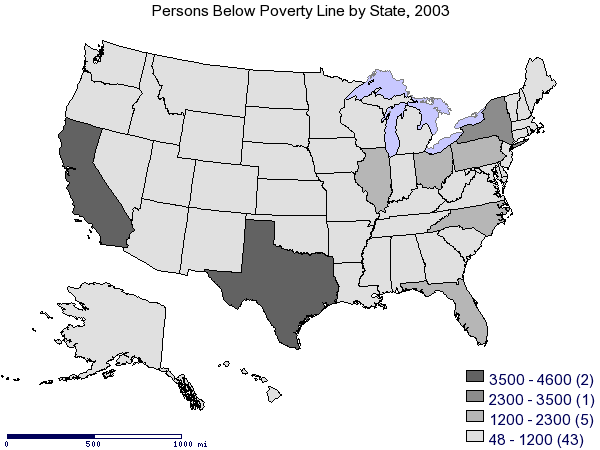
In a short well-written paragraph, explain why this map is not nearly as revealing as the map you made and why, for most analysis purposes, this map is not particularly useful.